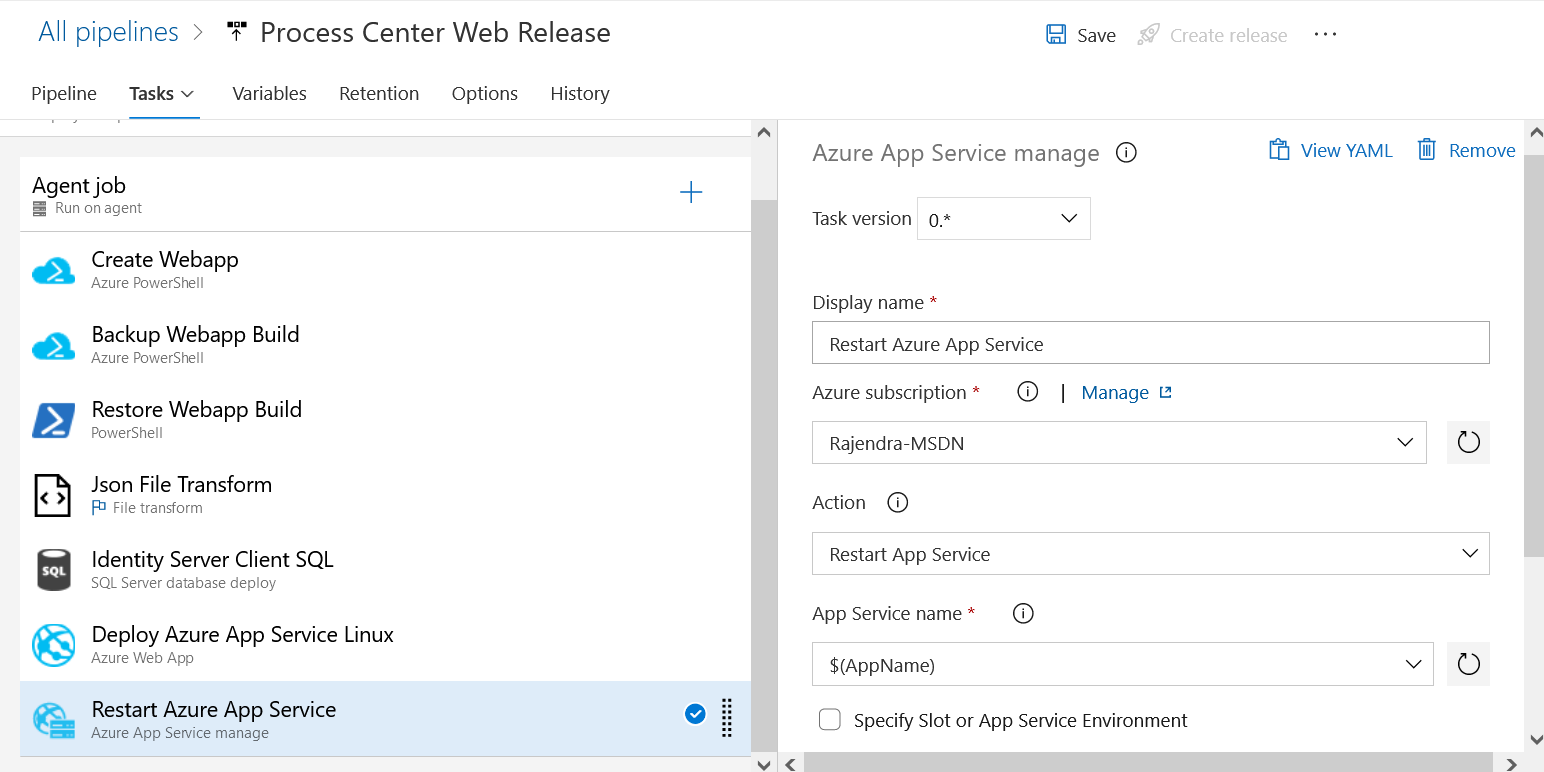
Configure Tasks
After adding the agent job, the next step is to configure the following tasks.
Create WebApp
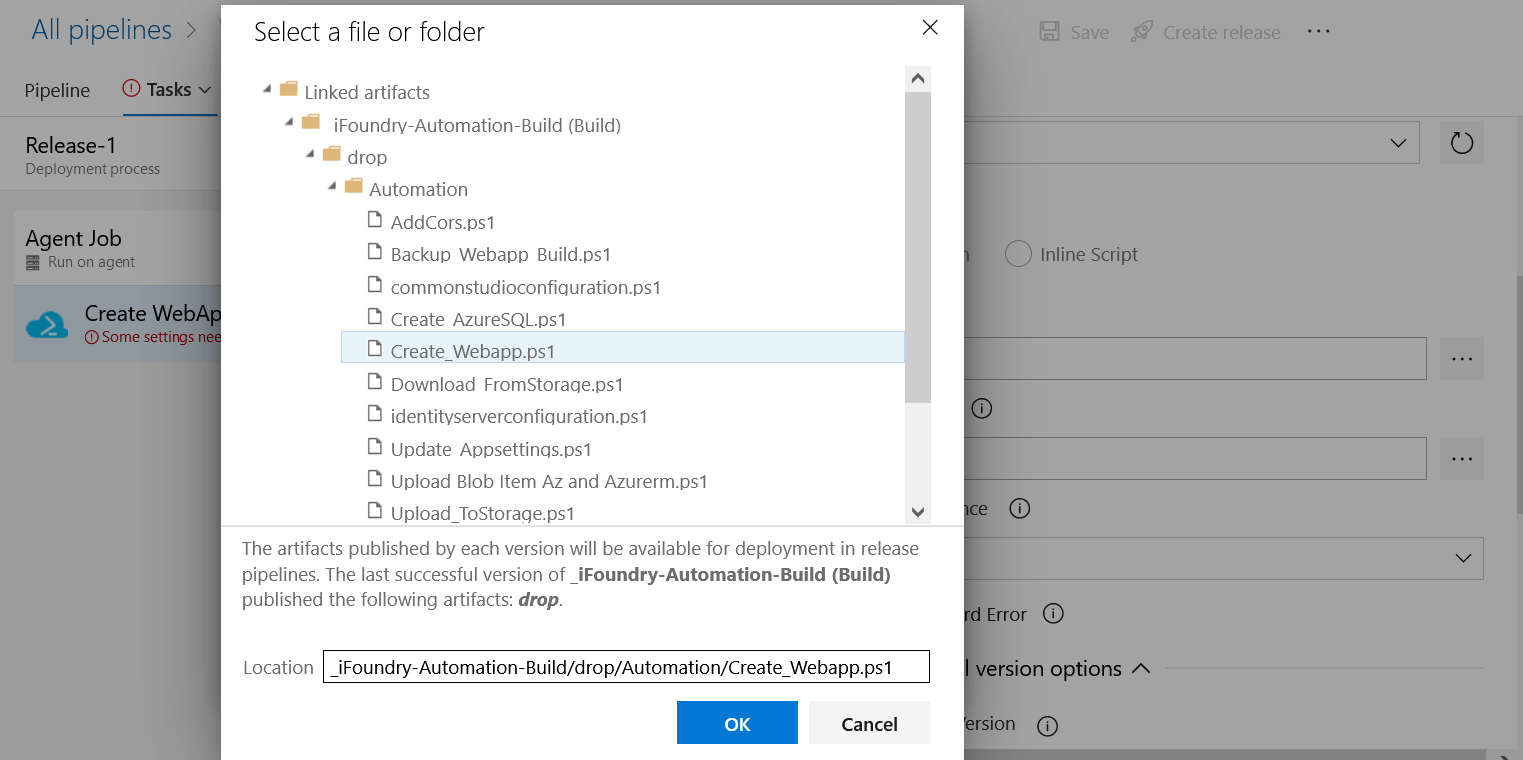
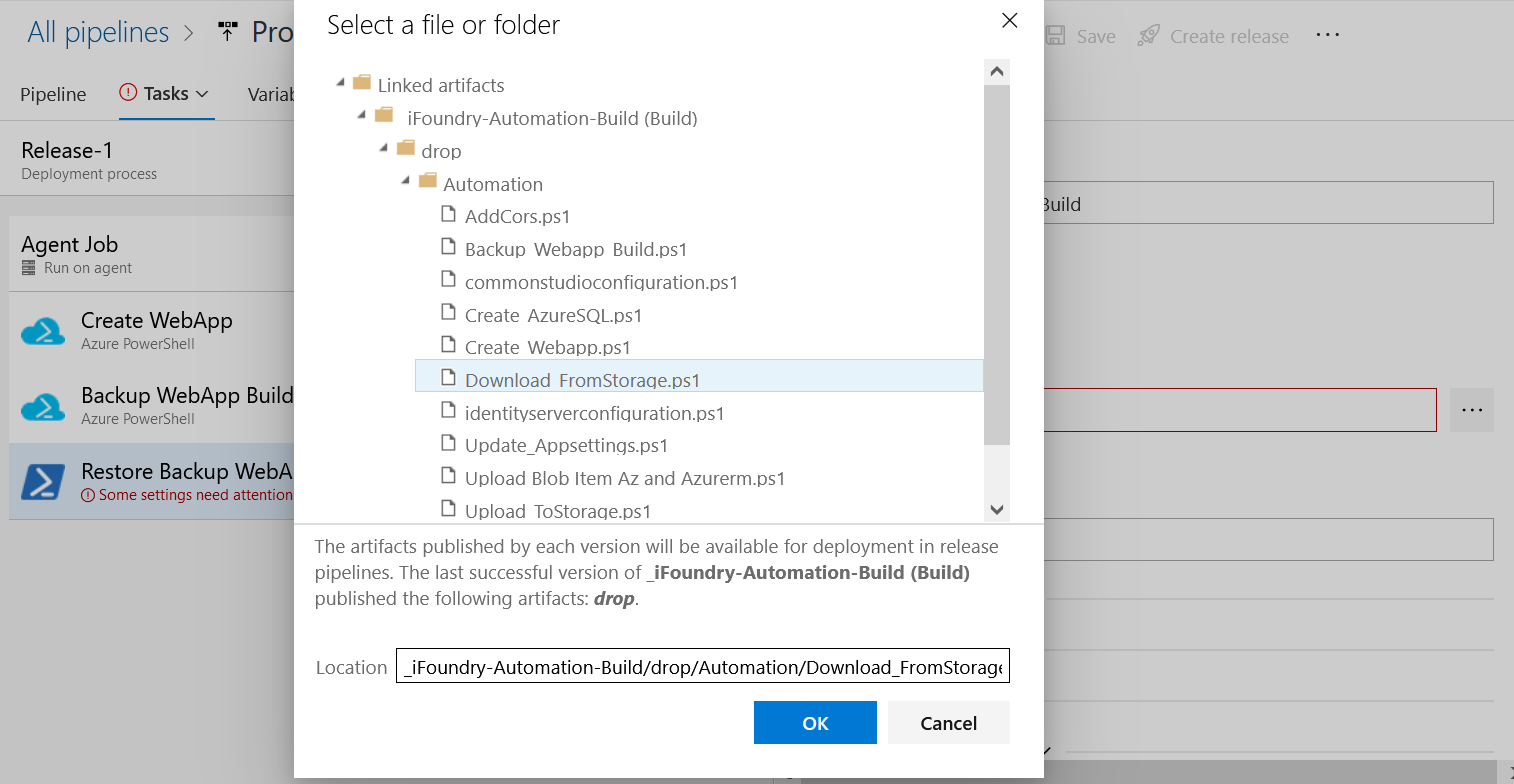
- Select Create WebApp and choose a subscription. Select the script path for the WebApp as shown in the image and select Ok.
- Add the script argument in the Script Argument Section.
-resourceGroupName "$(_ResourceGroupName)" -Location "$(_Location)" -ASPName "$(AppServicePlanName)" -ASPSize "$(AppServicePlanSize)" -AppEnvironment "$(DeployEnvironment)" -WebAppName "$(AppName)" - Select the Latest installed version under Azure PowerShell Version.
- Select "Use PowerShell Core" under Advanced.
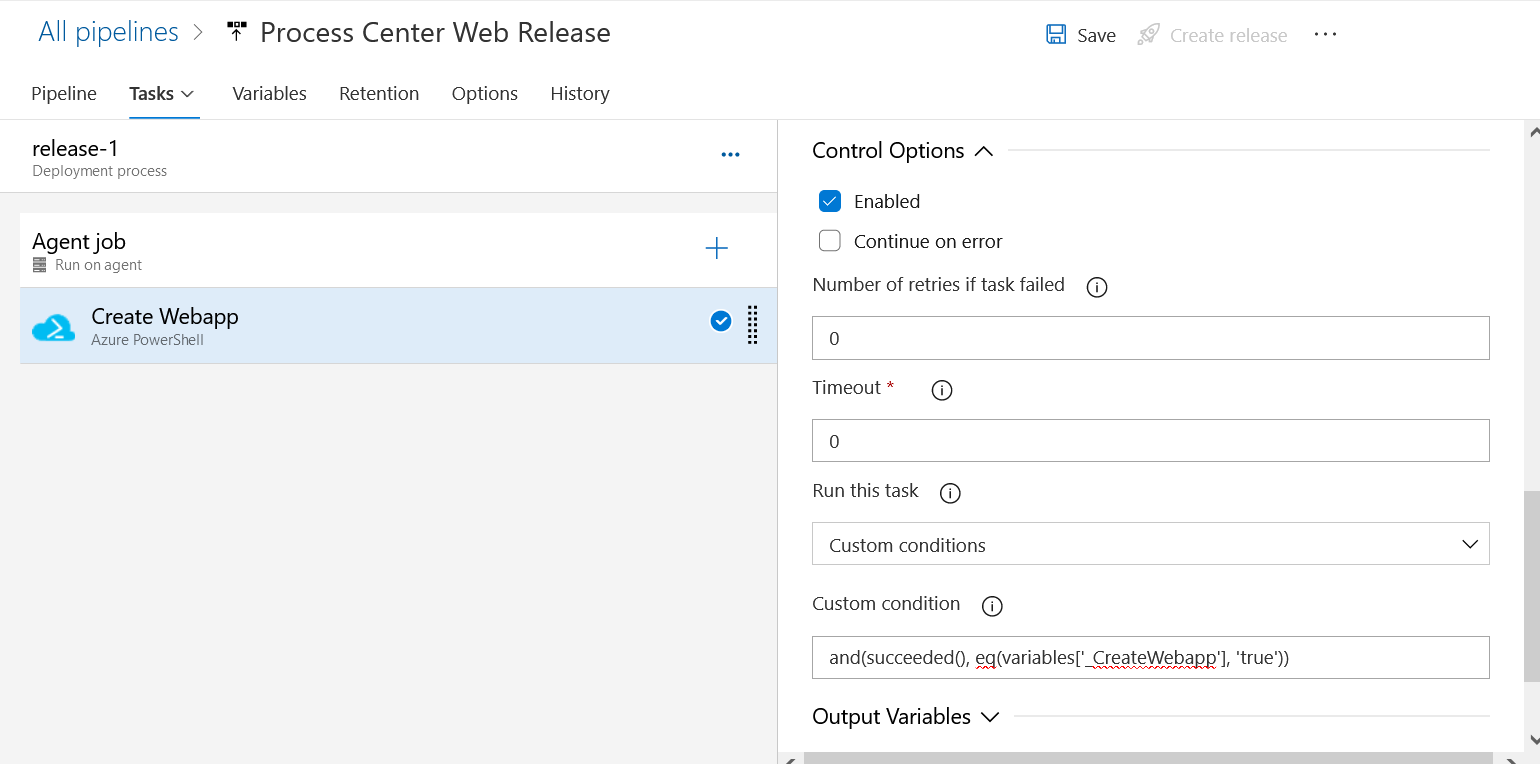
- Select Enabled under Control Options and add the custom condition.
and(succeeded(), eq(variables['_CreateWebapp'], 'true'))
Create Backup WebApp Build
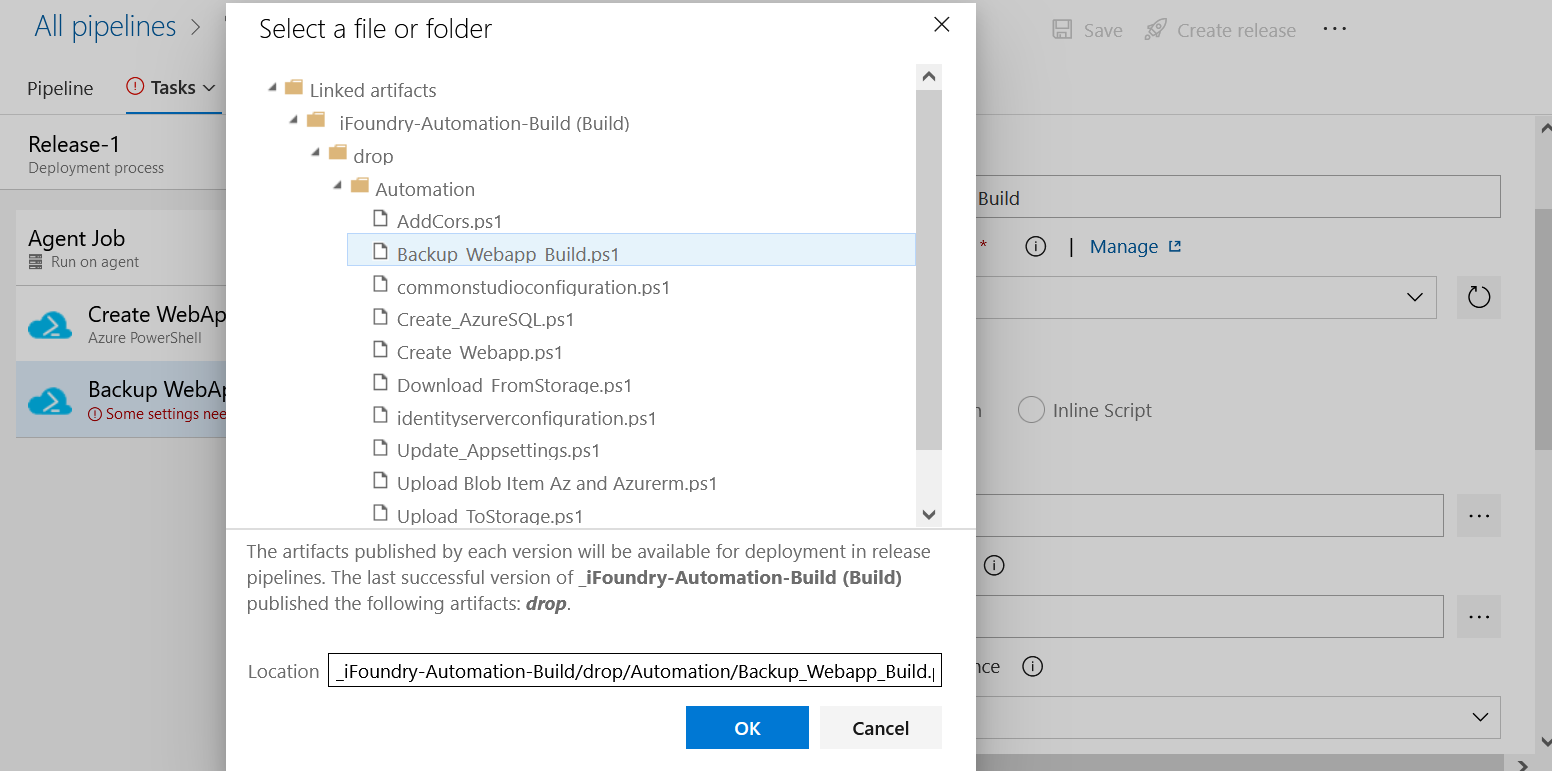
- Select Create Backup WebApp Build and the script path.
- Add the following script argument.
-WebAppName "$(AppName)" -StorageAccountName "$(StorageAccountName)" -StorageAccountkey "$(StorageAccountkey)" -StorageContainerName "$(StorageContainerName)" - Select the Latest installed version under Azure PowerShell Version.
- Select "Use PowerShell Core" under Advanced.
- Select Enabled under Control Options and add the custom condition.
and(succeeded(), eq(variables['BackupBuild'], 'true'))
Create Restore WebApp Build
- Select Create Restore WebApp Build.
- Add the script path and select Ok.
- Add the following script argument.
-RestoreFileUrl "$(RestoreFileUrl)" -StorageAccountkey "$(StorageAccountkey)" -FileExtension ".zip" - Select the Latest installed version under Azure PowerShell Version.
- Select "Use PowerShell Core" under Advanced.
- Select Enabled under Control Options and add the custom condition.
and(succeeded(), eq(variables['RestoreBuild'], 'true'))
JSON File Transform
- Select JSON File Transform.
- In the Target files text area, Select File format (JSON) and add -**/appsettings.json.
- Select Enabled under Control Options and add the custom condition.
and(succeeded(), eq(variables['RestoreBuild'], 'false'))
Add Identity Server Client SQL
- Select Add Identity Server Client SQL.
- Under Application and Configuration Settings > connection strings, add the following code.
Declare @redirecturl nvarchar(250)
Declare @postlogouturl nvarchar(250)
Declare @corsoriginurl nvarchar(250)
Declare @Clientid nvarchar(250)
Declare @Idurl nvarchar(250)
Declare @ClientName nvarchar(250)
Declare @roleId nvarchar(450)
Declare @adminUserId nvarchar(450)

set @ClientId='$(clientid)'
set @ClientName='$(clientid)'
set @redirecturl='$(redirectUri)'
set @postlogouturl='$(redirectUri)/'
set @corsoriginurl='$(CorsUrl)'
set @roleId = (select ID from AspNetRoles where Name='Administrator')
set @adminUserId = (select Id from aspnetusers where username='admin')

IF NOT EXISTS (SELECT 1 FROM [dbo].[Clients] WHERE ClientId = @ClientId)
BEGIN
	INSERT [dbo].[Clients] ( [AbsoluteRefreshTokenLifetime],
	 [AccessTokenLifetime], [AccessTokenType],
	 [AllowAccessTokensViaBrowser], [AllowOfflineAccess], [AllowPlainTextPkce],
	 [AllowRememberConsent], [AlwaysIncludeUserClaimsInIdToken], [AlwaysSendClientClaims],
	 [AuthorizationCodeLifetime], [ClientId], [ClientName], [ClientUri], [EnableLocalLogin],
	 [Enabled], [IdentityTokenLifetime], [IncludeJwtId], [LogoUri], [LogoutSessionRequired],
	 [LogoutUri], [PrefixClientClaims], [ProtocolType], [RefreshTokenExpiration], [RefreshTokenUsage],
	 [RequireClientSecret], [RequireConsent], [RequirePkce], [SlidingRefreshTokenLifetime],
	 [UpdateAccessTokenClaimsOnRefresh], [ClientType], [Description], [UserInfoEndPoint],
	 [LogoInfo], [BackChannelLogoutSessionRequired], [BackChannelLogoutUri], [ClientClaimsPrefix],
	 [ConsentLifetime], [FrontChannelLogoutSessionRequired], [FrontChannelLogoutUri],
	 [PairWiseSubjectSalt], [IsActive], [ClientGroupId], [CreatedDate], [ModifiedDate],
	 [CreatedBy], [ModifiedBy], [IsReadOnly],[created])
	 VALUES (2592000, 3600, 0, 0, 1, 0, 1, 0, 0, 300,
	 @ClientId, @ClientName, NULL, 1, 1, 300, 0, N'', 1, NULL, 1,
	 N'oidc', 1, 1, 0, 0, 1, 1296000, 0, N'spa Web App', N'', N'',
	 NULL, 1, NULL, NULL, NULL, 1, NULL, NULL, 1, NULL, Getdate(), Getdate(), @adminUserId, @adminUserId, 0,Getdate())

	 PRINT 'Inserted ClientId '+@ClientId
END

set @Idurl = (select Id from clients where clientid=@ClientId)

IF NOT EXISTS (SELECT 1 FROM [dbo].[ClientIdPRestrictions] WHERE ClientId = @Idurl AND [Provider] = 'local')
BEGIN
	INSERT [dbo].[ClientIdPRestrictions] ( [ClientId], [Provider]) VALUES (@Idurl, N'local')
	PRINT 'Inserted Provider local'
END
IF NOT EXISTS (SELECT 1 FROM [dbo].[ClientIdPRestrictions] WHERE ClientId = @Idurl AND [Provider] = 'azuread')
BEGIN
	INSERT [dbo].[ClientIdPRestrictions] ( [ClientId], [Provider]) VALUES (@Idurl, N'azuread')
	PRINT 'Inserted Provider azuread'
END
IF NOT EXISTS (SELECT 1 FROM [dbo].[ClientIdPRestrictions] WHERE ClientId = @Idurl AND [Provider] = 'google')
BEGIN
	INSERT [dbo].[ClientIdPRestrictions] ( [ClientId], [Provider]) VALUES (@Idurl, N'google')
	PRINT 'Inserted Provider google'
END

IF NOT EXISTS (SELECT 1 FROM [dbo].[ClientScopes] WHERE ClientId = @Idurl AND Scope = 'openid')
BEGIN
	INSERT [dbo].[ClientScopes] ( [ClientId], [Scope], [ConsumingClientId]) VALUES ( @Idurl, N'openid', 0)
	PRINT 'Inserted Scope openid'
END
IF NOT EXISTS (SELECT 1 FROM [dbo].[ClientScopes] WHERE ClientId = @Idurl AND Scope = 'profile')
BEGIN
	INSERT [dbo].[ClientScopes] ( [ClientId], [Scope], [ConsumingClientId]) VALUES ( @Idurl, N'profile', 0)
	PRINT 'Inserted Scope profile'
END
IF NOT EXISTS (SELECT 1 FROM [dbo].[ClientScopes] WHERE ClientId = @Idurl AND Scope = 'ManagementApi')
BEGIN
	INSERT [dbo].[ClientScopes] ( [ClientId], [Scope], [ConsumingClientId]) VALUES ( @Idurl, N'ManagementApi', 0)
	PRINT 'Inserted Scope ManagementApi'
END
IF NOT EXISTS (SELECT 1 FROM [dbo].[ClientScopes] WHERE ClientId = @Idurl AND Scope = 'offline_access')
BEGIN
	INSERT [dbo].[ClientScopes] ([ClientId], [Scope], [ConsumingClientId]) VALUES (@Idurl, N'offline_access', 0)
	PRINT 'Inserted Scope offline_access'
END

IF NOT EXISTS (SELECT 1 FROM [dbo].[ClientGrantTypes] WHERE ClientId = @Idurl AND GrantType = 'authorization_code')
BEGIN
	INSERT [dbo].[ClientGrantTypes] ( [ClientId], [GrantType]) VALUES (@Idurl, N'authorization_code')
	PRINT 'Inserted GrantType authorization_code'
END

IF NOT EXISTS (SELECT 1 FROM [dbo].[ClientCorsOrigins] WHERE ClientId = @Idurl AND Origin = @corsoriginurl)
BEGIN
	INSERT INTO dbo.ClientCorsOrigins VALUES(@Idurl,@corsoriginurl)
	PRINT 'Inserted ClientCorsOrigin '+@corsoriginurl
END

IF NOT EXISTS (SELECT 1 FROM [dbo].[ClientRedirectUris] WHERE ClientId = @Idurl AND RedirectUri = @redirecturl)
BEGIN
	INSERT INTO dbo.ClientRedirectUris VALUES(@Idurl,@redirecturl)
	PRINT 'Inserted RedirectUri '+@redirecturl
END

IF NOT EXISTS (SELECT 1 FROM [dbo].[ClientPostLogoutRedirectUris] WHERE ClientId = @Idurl AND PostLogoutRedirectUri = @postlogouturl)
BEGIN
	INSERT INTO dbo.ClientPostLogoutRedirectUris VALUES(@Idurl,@postlogouturl)
	PRINT 'Inserted PostLogoutRedirectUri '+@postlogouturl
END

IF NOT EXISTS (SELECT 1 FROM [dbo].[ROLECLIENTS] WHERE ClientId = @Idurl AND RoleId = @roleId)
BEGIN
	INSERT INTO [DBO].[ROLECLIENTS] values (@roleId ,@Idurl,0)
	PRINT 'Inserted ROLECLIENTS'
END
- Provide Server Name, Database Name, Authentication, SQL User name and SQL password.
- Select Enabled under Control Options and add the custom condition.
and(succeeded(), eq(variables['AddIDServerClient'], 'true'), eq(variables['type'], 'SQLServer'))
Deploy Azure App Service Linux
- Select Deploy Azure App Service Linux.
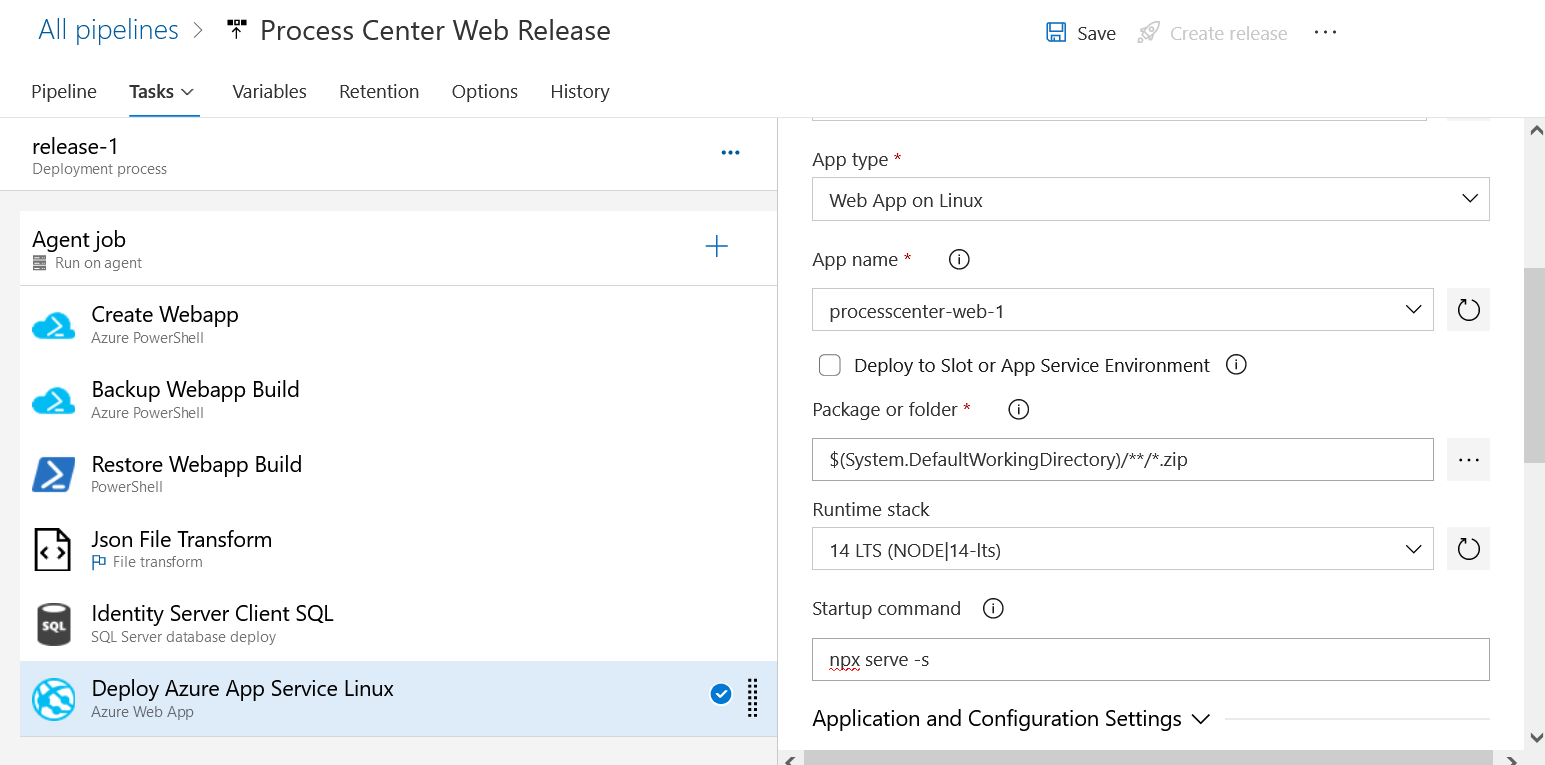
- Choose a subscription, App type, App name, Resource group, Slot, script path for the deploy service as shown in the image.
- Select "Deploy to Slot or App Service Environment".
- Select Enabled under Control Options and add the custom condition.
and(succeeded(), eq(variables['DeployEnvironment'], 'Linux'))
Restart Azure App Service
- Select restart Azure App Service.
- Choose a subscription, Action (Restart App Service) and App Service name for the Azure app service as shown in the image and select Save.