Setting up Quote Management System
Quote Management is deployed using various Azure resources such as Azure SQL database, API apps, Web apps, Logic apps, and Virtual Machine.
Azure Subscription is required to deploy/implement BizDynamics components.
Prerequisites
Ensure that your computer meets the hardware and software requirements that are listed here.
Hardware Requirements
For Development Team: To develop and customize Quote Management System, the following are the hardware requirements.
| Hardware Details | Details |
|---|---|
| CPU | i3 – 3.40 GHz and above |
| RAM | 8 GB |
| HDD | 250 GB |
The following are the hardware requirements for development environment (Non ISO) and BizDynamics enterprise configuration.
| Category | Service | Region | Quantity | Usage | Description |
|---|---|---|---|---|---|
| Management | Scheduler Standard | US East | 1 unit | - | Notification Framework Scheduler |
| Web + Mobile | Notification Hubs Basic | US East | 1 unit | 1 Million Pushes | Notification Framework Notification Hub |
| Web + Mobile | Notification Hubs Basic | US East | 1 unit | 1 Million Pushes | Notification Framework Notification Hub |
| Hybrid Integration | Service Bus Operations Basic | US East | 1 Million operations | - | Notification Framework Service Bus |
| Data + Storage | RedisCache C1 Basic | US East | 1 unit | 744 Hours | Redis Cache For Notification Framework |
| Data + Storage | Azure SQL Standard S1 | US East | 1 unit | 744 Hours | Notification Framework Data Store |
| Data + Storage | Document DBS1 DocumentDB Hours | US East | 1 unit | - | Notification Framework Interim Store |
| Web + Mobile | Azure App Service Basic B2 | US East | 1 Instance | 744 Hours | Quoting App |
| Data + Storage | Azure SQL Standard S1 | US East | 1 unit | 744 Hours | Quoting DB |
| Data + Storage | Azure SQL Standard S0 | US East | 5 units | 744 Hours | Exp. Studio DB, PLM DB, DTX DB, Workbench DB, and Identity Server DB |
| Compute | Virtual Machine D2 v2 (2 cores, 7 GB RAM, 100 GB) Standard Non-Windows | US East | 1 unit | 400 Hours | iFoundry Server |
| Data + Storage | RedisCache C1 Basic | US East | 1 unit | 744 Hours | Caching BizDynamics |
| Data + Storage | Page Blobs and Disks | US East | 500 GB | - | All Attachments and Coaching content. |
| Networking | Bandwidth | US East | 50 GB | - | Data Transfer |
| Networking | VPN Gateway Standard | US East | 1 VPN | 744 Hours | VPN |
| Web + Mobile | Azure App Service Basic B2 | US East | 1 Instance | 744 Hours | DTX, Exp. Studio, PLM, and BizDynamics Admin |
The following are the hardware requirements for development environment (ISO) and BizDynamics enterprise configuration.
| Category | Service | Region | Quantity | Usage | Description |
|---|---|---|---|---|---|
| Management | Scheduler Standard | US East | 1 unit | - | Notification Framework Scheduler |
| Web + Mobile | Notification Hubs Basic | US East | 1 unit | 1 Million Pushes | Notification Framework Notification Hub |
| Web + Mobile | Notification Hubs Basic | US East | 1 unit | 1 Million Pushes | Notification Framework Notification Hub |
| Hybrid Integration | Service Bus Operations Basic | US East | 1 Million Ops | - | Notification Framework Service Bus |
| Data + Storage | RedisCache C1 Basic | US East | 1 unit | 744 Hours | Redis Cache For Notification Framework |
| Data + Storage | Azure SQL Standard S1 | US East | 1 unit | 744 Hours | Notification Framework Data Store |
| Data + Storage | Document DB S1 | US East | 1 unit | - | Notification Framework Interim Store |
| Web + Mobile | Azure App Service Basic B2 | US East | 1 Instance | 744 Hours | Quoting App |
| Data + Storage | Azure SQL Standard S1 | US East | 1 unit | 744 Hours | Quoting DB |
| Data + Storage | Azure SQL Standard S0 | US East | 3 Units | 744 Hours | Exp. Studio DB, DTX DB, and Identity Server DB |
| Data + Storage | Azure SQL Standard S3 | US East | 1 unit | 744 Hours | Workbench DB |
| Compute | Virtual Machine D11 (2 cores, 14 GB RAM, 100 GB) Standard Non-Windows | US East | 1 unit | 400 Hours | iFoundry Server |
| Data + Storage | RedisCache C1 Basic | US East | 1 unit | 744 Hours | Caching BizDynamics |
| Data + Storage | Page Blobs and Disks | US East | 500 GB | - | All Attachments and Coaching content |
| Networking | Bandwidth | US East | 50 GB | - | Data Transfer |
| Networking | VPN Gateway Standard | US East | 1 VPN | 744 Hours | VPN |
| Web + Mobile | Azure App Service Basic B2 | US East | 1 Instance | 744 Hours | DTX, Exp. Studio, PLM, and BizDynamics Admin |
| Data + Storage | Azure SQL Standard S2 | US East | 1 unit | 744 Hours | iFoundry Server Database |
For Testing Team: The following are the hardware requirements to test the features of Quote Management System.
| Hardware Details | Details |
|---|---|
| CPU | i3 – 3.40 GHz and above |
| RAM | 4 GB |
| HDD | 250 GB |
The following are the hardware requirements for testing environment (Non ISO) and BizDynamics enterprise configuration.
| Category | Service | Region | Quantity | Usage | Description |
|---|---|---|---|---|---|
| Management | Scheduler Standard | US East | 1 unit | - | Notification Framework Scheduler |
| Web + Mobile | Notification Hubs Basic | US East | 1 unit | 1 Million Pushes | Notification Framework Notification Hub |
| Web + Mobile | Notification Hubs Basic | US East | 1 unit | 1 Million Pushes | Notification Framework Notification Hub |
| Hybrid Integration | Service Bus Operations Basic | US East | 1 Million operations | - | Notification Framework Service Bus |
| Data + Storage | RedisCache C1 Basic | US East | 1 unit | 744 Hours | Redis Cache For Notification Framework |
| Data + Storage | Azure SQL Standard S1 | US East | 1 unit | 744 Hours | Notification Framework Data Store |
| Data + Storage | Document DB S1 | US East | 1 unit | - | Notification Framework Interim Store |
| Web + Mobile | Azure App Service Basic B2 | US East | 1 Instance | 744 Hours | Quoting App |
| Data + Storage | Azure SQL Standard S2 | US East | 1 unit | 744 Hours | Quoting DB |
| Data + Storage | Azure SQL Standard S0 | US East | 3 Units | 744 Hours | PLM DB, DTX DB, and Identity Server DB |
| Compute | Virtual Machine D2 v2 (2 cores, 7 GB RAM, 100 GB) Standard Non-Windows | US East | 1 unit | 400 Hours | iFoundry Server |
| Data + Storage | RedisCache C1 Basic | US East | 1 unit | 744 Hours | Caching BizDynamics |
| Data + Storage | Page Blobs and Disks | US East | 500 GB | - | All Attachments and Coaching content |
| Networking | Bandwidth | US East | 50 GB | - | Data Transfer |
| Networking | VPN Gateway Standard | US East | 1 VPN | 744 Hours | VPN |
| Web + Mobile | Azure App Service Basic B2 | US East | 1 Instance | 744 Hours | DTX and BizDynamics Admin |
The following are the hardware requirements for testing environment (ISO) and BizDynamics enterprise configuration.
| Category | Service | Region | Quantity | Usage | Description |
|---|---|---|---|---|---|
| Management | Scheduler Standard | US East | 1 unit | - | Notification Framework Scheduler |
| Web + Mobile | Notification Hubs Basic | US East | 1 unit | 1 Million Pushes | Notification Framework Notification Hub |
| Web + Mobile | Notification Hubs Basic | US East | 1 unit | 1 Million Pushes | Notification Framework Notification Hub |
| Hybrid Integration | Service Bus Operations Basic | US East | 1 Million operations | - | Notification Framework Service Bus |
| Data + Storage | RedisCache C1 Basic | US East | 1 unit | 744 Hours | Redis Cache For Notification Framework |
| Data + Storage | Azure SQL Standard S1 | US East | 1 unit | 744 Hours | Notification Framework Data Store |
| Data + Storage | Document DB S1 | US East | 1 unit | - | Notification Framework Interim Store |
| Web + Mobile | Azure App Service Basic B2 | US East | 1 Instance | 744 Hours | Quoting App |
| Data + Storage | Azure SQL Standard S1 | US East | 1 unit | 744 Hours | Quoting DB |
| Data + Storage | Azure SQL Standard S0 | US East | 2 Units | 744 Hours | DTX DB and Identity Server DB |
| Compute | Virtual Machine D11 (2 cores, 14 GB RAM, 100 GB) Standard Non-Windows | US East | 1 unit | 400 Hours | iFoundry Server |
| Data + Storage | RedisCache C2 Basic | US East | 1 unit | 744 Hours | Caching BizDynamics |
| Data + Storage | Page Blobs and Disks | US East | 500 GB | - | All Attachments and Coaching content |
| Networking | Bandwidth | US East | 50 GB | - | Data Transfer |
| Networking | VPN Gateway Standard | US East | 1 VPN | 744 Hours | VPN |
| Web + Mobile | Azure App Service Basic B2 | US East | 1 Instance | 744 Hours | DTX, Exp. Studio, PLM, and BizDynamics Admin |
| Data + Storage | Azure SQL Standard S2 | US East | 1 unit | 744 Hours | iFoundry Server Database |
For Hardware Requirements (Scale-Up Plan): Here, you can view multiple configuration options for setting up server environments. Based on the load requirements, the appropriate configuration can be used to set up the environments.
Configuration1 is basic setup of Quote Management System without notification services.
For production environment (Non ISO), the following are the hardware requirements.
| Category | Service | Region | Quantity | Usage | Description |
|---|---|---|---|---|---|
| Networking | VPN Gateway Standard VPN Gateway | US East | 1 VPN | 744 Hours | VPN |
| Networking | Bandwidth | US East | 50 GB | - | Data Transfer |
| Web + Mobile | Azure App Service Standard Medium (S2) | US East | 1 Instances | 744 Hours | DTX, Exp Studio, Identity Server, and BizDynamics Admin. |
| Web + Mobile | Azure App Service Standard Medium (S2) | US East | 1 Instances | 744 Hours | Quoting App |
| Data + Storage | Azure SQL Standard S1 | US East | 1 unit | 744 Hours | Quoting DB |
| Data + Storage | Page Blobs and Disks Geographically Redundant | US East | 500 GB | - | All Attachments and.Coaching content |
| Data + Storage | RedisCache C1 Standard | US East | 1 unit | 744 Hours | Caching BizDynamics |
| Data + Storage | Azure SQL Standard S1 | US East | 3 Units | 744 Hours | DTXDB, Identity Server, PLM |
| Compute | Virtual Machine D3 v2 (2 cores, 7 GB RAM, 100 GB SSD) Standard Non-Windows | US East | 1 units | 744 Hours | iFoundry Server |
| Hybrid Integration | Service Bus Operations Basic | US East | 1 Million operations | - | Notification Framework Service Bus |
| Management | Scheduler Standard | US East | 1 unit | - | Notification Framework Scheduler |
| Data + Storage | Azure SQL Standard S1 | US East | 1 unit | 744 Hours | Notification Framework Data Store |
| Data + Storage | Document DBS1 DocumentDB Hours | US East | 1 unit | - | Notification Framework Interim Store |
| Web + Mobile | Notification Hubs Basic | US East | 1 unit | 1 Million Pushes | Notification Framework Notification Hub |
For production environment (ISO), the following are the hardware requirements.
| Category | Service | Region | Quantity | Usage | Description |
|---|---|---|---|---|---|
| Networking | VPN Gateway Standard | US East | 1 VPN | 744 Hours | VPN |
| Networking | Bandwidth | US East | 50 GB | - | Data Transfer |
| Web + Mobile | Azure App Service Standard Medium (S2) | US East | 1 Instance | 744 Hours | DTX, Identity Server, and BizDynamics Admin. |
| Web + Mobile | Azure App Service Standard Medium (S2) | US East | 1 Instance | 744 Hours | Quoting App |
| Data + Storage | Azure SQL Standard S2 | US East | 1 unit | 744 Hours | Quoting DB |
| Data + Storage | Page Blobs and Disks Geographically Redundant | US East | 500 GB | - | All Attachments and.Coaching content |
| Data + Storage | RedisCache C2 Standard | US East | 1 unit | 744 Hours | Caching BizDynamics |
| Data + Storage | Azure SQL Standard S1 | US East | 2 Units | 744 Hours | DTXDB, Identity Server |
| Compute | Virtual Machine D11 (2 cores, 14 GB RAM, 100 GB) Standard Non-Windows | US East | 1 units | 744 Hours | iFoundry Server |
| Hybrid Integration | Service Bus Operations Basic | US East | 1 Million operations | - | Notification Framework Service Bus |
| Management | Scheduler Standard | US East | 1 unit | - | Notification Framework Scheduler |
| Data + Storage | Azure SQL Standard S1 | US East | 1 unit | 744 Hours | Notification Framework Data Store |
| Data + Storage | Document DB S1 | US East | 1 unit | - | Notification Framework Interim Store |
| Web + Mobile | Notification Hubs Basic | US East | 1 unit | 1 Million Pushes | Notification Framework Notification Hub |
| Data + Storage | Azure SQL Standard S2 | US East | 1 unit | 744 Hours | iFoundry Server Database |
Configuration 2 is advanced setup of BizDynamics application with notification services.
For production environment (Non ISO), the following are the hardware requirements.
| Category | Service | Region | Quantity | Usage | Description |
|---|---|---|---|---|---|
| Networking | VPN Gateway Standard VPN Gateway | US East | 1 VPN | 744 Hours | VPN |
| Networking | Bandwidth | US East | 50 GB | - | Data Transfer |
| Web + Mobile | Azure App Service Standard Medium (S2) | US East | 1 Instance | 744 Hours | DTX, Exp Studio, Identity Server, and BizDynamics Admin |
| Web + Mobile | Azure App Service Standard Medium (S2) | US East | 1 Instance | 744 Hours | Quoting App |
| Data + Storage | Azure SQL Standard S3 | US East | 1 unit | 744 Hours | Quoting DB |
| Data + Storage | Page Blobs and Disks Geographically Redundant | US East | 500 GB | - | All Attachments and.Coaching content |
| Data + Storage | RedisCache C2 Standard | US East | 1 unit | 744 Hours | Caching BizDynamics |
| Data + Storage | Azure SQL Standard S1 | US East | 2 units | 744 Hours | DTX DB, Identity Server |
| Data + Storage | Azure SQL Standard S2 | US East | 1 unit | 744 Hours | PLM |
| Compute | Virtual Machine D3 v2 (2 cores, 7 GB RAM, 100 GB SSD) Standard Non-Windows | US East | 2 units | 744 Hours | iFoundry Server |
| Hybrid Integration | Service Bus Operations Basic | US East | 1 Million operations | - | Notification Framework Service Bus |
| Management | Scheduler Standard | US East | 1 unit | - | Notification Framework Scheduler |
| Data + Storage | Azure SQL Standard S1 | US East | 1 unit | 744 Hours | Notification Framework Data Store |
| Data + Storage | Document DBS1 DocumentDB Hours | US East | 1 unit | - | Notification Framework Interim Store |
| Web + Mobile | Notification Hubs Basic | US East | 1 unit | 1 Million Pushes | Notification Framework Notification Hub |
For production environment (ISO), the following are the hardware requirements.
| Category | Service | Region | Quantity | Usage | Description |
|---|---|---|---|---|---|
| Networking | VPN Gateway Standard | US East | 1 VPN | 744 Hours | VPN |
| Networking | Bandwidth | US East | 50 GB | - | Data Transfer |
| Web + Mobile | Azure App Service Standard S2 | US East | 1 Instance | 744 Hours | DTX, Identity Server, and BizDynamics Admin |
| Web + Mobile | Azure App Service Standard S2 | US East | 1 Instance | 744 Hours | Quoting App |
| Data + Storage | Azure SQL Standard S3 | US East | 1 unit | 744 Hours | Quoting DB |
| Data + Storage | Page Blobs and Disks Geographically Redundant | US East | 500 GB | - | All Attachments and.Coaching content |
| Data + Storage | RedisCache C2 Standard | US East | 1 unit | 744 Hours | Caching BizDynamics |
| Data + Storage | Azure SQL Standard S2 | US East | 2 Units | 744 Hours | DTX DB, & Identity Server |
| Compute | Virtual Machine D3 (4 cores, 14 GB RAM, 200 GB) Standard Non-Windows | US East | 2 Units | 744 Hours | iFoundry Server |
| Hybrid Integration | Service Bus Operations Basic | US East | 1 Million operations | - | Notification Framework Service Bus |
| Management | Scheduler Standard | US East | 1 unit | - | Notification Framework Scheduler |
| Data + Storage | Azure SQL Standard S1 | US East | 1 unit | 744 Hours | Notification Framework Data Store |
| Data + Storage | Document DB S1 | US East | 1 unit | - | Notification Framework Interim Store |
| Web + Mobile | Notification Hubs Basic | US East | 1 unit | 1 Million Pushes | Notification Framework Notification Hub |
| Data + Storage | Azure SQL Standard S3 | US East | 1 unit | 744 Hours | iFoundry Server Database |
For configuration 3
| Category | Service | Region | Quantity | Usage | Description |
|---|---|---|---|---|---|
| Networking | VPN Gateway Standard | US East | 1 VPN | 744 Hours | VPN |
| Networking | Bandwidth | US East | 50 GB | - | Data Transfer |
| Web + Mobile | Azure App Service Standard S2 | US East | 2 Instances | 500 Hours | Distribution Center, Exp Studio, PLM, and BizDynamics Admin. |
| Web + Mobile | Azure App Service Standard Medium S2 | US East | 2 Instances | 744 Hours | Quoting App |
| Data + Storage | Azure SQL Premium P1 | US East | 1 unit | 744 Hours | Quoting DB |
| Data + Storage | Azure SQL Standard S1 | US East | 4 units | 744 Hours | Exp Studio DB, PLM, CatalogDB, PLM Workbench |
| Computer | Virtual Machine D3 v2 (4 cores, 14 GB RAM, 200 GB SSD) Standard Non-Windows | US East | 2 units | 744 Hours | iFoundry Server |
| Data + Storage | RedisCache C3 Standard | US East | 1 unit | 744 Hours | Caching BizDynamics and Distribution Center |
| Data + Storage | Page Blobs and Disks Geographically Redundant | US East | 500 GB | - | All Attachments and Coaching content. |
| Hybrid Integration | Service Bus Operations Basic | US East | 20 Million operations | - | Notification Framework Service Bus |
| Management | Scheduler Standard | US East | 1 unit | - | Notification Framework Scheduler |
| Web + Mobile | Notification Hubs Basic | US East | 1 unit | 1 Million Pushes | Notification Framework Notification Hub |
| Data + Storage | Azure SQL Standard S1 | US East | 1 unit | 744 Hours | Notification Framework Data Store |
| Data + Storage | RedisCache C1 Basic | US East | 1 unit | 744 Hours | Redis Cache For Notification Framework |
Software Requirements
Azure Resources
To deploy BizDynamics components, you need to have an Azure subscription. The following Azure apps are used for deploying BizDynamics components.
- Resource Groups
- App Service Plan
- Virtual Machine
- Azure SQL DB
- Document DB
- Storage
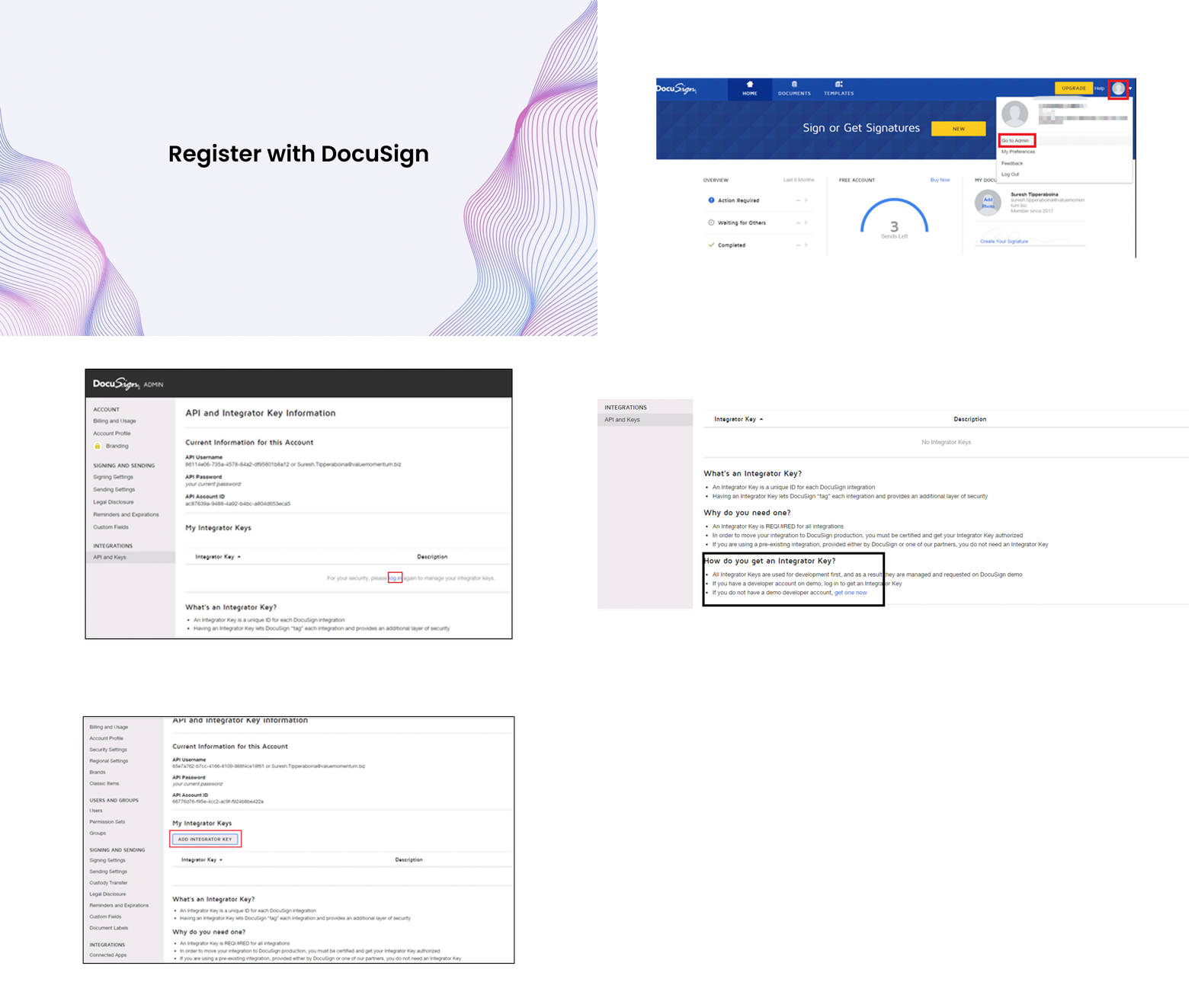
Register with DocuSign
- Go to DocuSign registration page: https://secure.docusign.com/signup/free?tgr=com-freeplan-netlogin&elqCampaignId=9288 The registration page appears.
- Provide the required details and click GET STARTED. Your account activation link is sent to your Email address.
- Once you receive the Email, click on the ACTIVATE button.
- The system navigates you to the Activate Page. On this page, provide the Password and click on the Confirm button. The dashboard appears. Click the profile drop-down list on the top-right corner of the screen and then click Go To Admin.
- The Billing and Usage screen appears. Click API and Keys in the left pane under INTEGRATIONS. The following screen appears.
- Click Login under My Integrator Keys. The login screen appears.
- Enter the password and click LOG IN. The INTEGRATIONS screen appears. Click get one now hyperlink.
- Once you click on the hyperlink, you need to follow the same steps from 2 to 6 to complete the registration.
- Once registration is complete, login through the following URL. https://secure.docusign.com/signup/develop
- On Account activation, navigate to the Go to Admin and click API and Keys in the left pane under INTEGRATIONS. Click ADD INTEGRATION KEY. The Add API Integrator Key screen appears.
- Provide the App Description as TEST and then click Add. The API and Integrator Key Information screen appears once key is generated.
- Once Integration Key is generated, navigate to the published Quoting API App, and modify the below Keys in App Settings.
<add key="DocuSignAccountEmail" value="you registered email Address " />. Here DocuSignAccountEmail is your registered Email ID.<add key="DocuSignAccountPassword" value="PASS" />(provide the same password that is used for registration). DocuSignAccountPassword is your password.<add key="DocuSignAccountintegratorKey" value="TEST-31dae789-d441-4fa5-ab0f-d838eade3ab5" />. DocuSignAccountintegratorKey is the Integration Key which is generated. You need to concatenate the App description and Key.
Once you configure the App Setting, publish the DealFoundry.DocuSignNotification application. Publishing is required once the document is sent for signature and an action is performed on the document by the customer. Customer can decline or complete the Signature. This application receives the message as a notification by configuring the App through Connect, and it updates the status as Proposal Signed or Proposal Declined based on the action.
DealFoundry.DocuSignNotification needs to be published as Web App and change the Connection string and other configuration changes. Once application is published as web App, note the URL to configure the Connect. To configure through Connect, follow these steps:
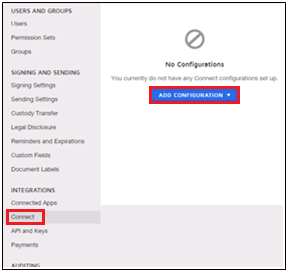
- Click Connect.
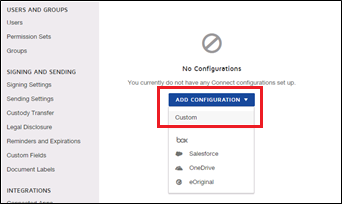
- Click ADD CONFIGURATION and then click Custom. The Custom Configuration Settings screen appears.
- Provide Name as DocuSignInt and URL, where the DealFoundry. DocuSignNotification is published.
- The Trigger Events screen appears. Select the Trigger Events and click the Add button.
Release Folder Structure
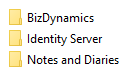
The given image shows the release folder structure of BizDynamics.
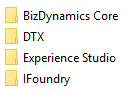
Web Apps
Web apps contain the folders shown in the image.
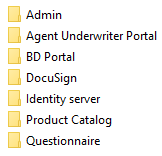
API Apps
API apps contain the folders shown in the image.
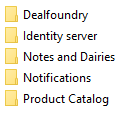
Database
Database contain the folders shown in the image.